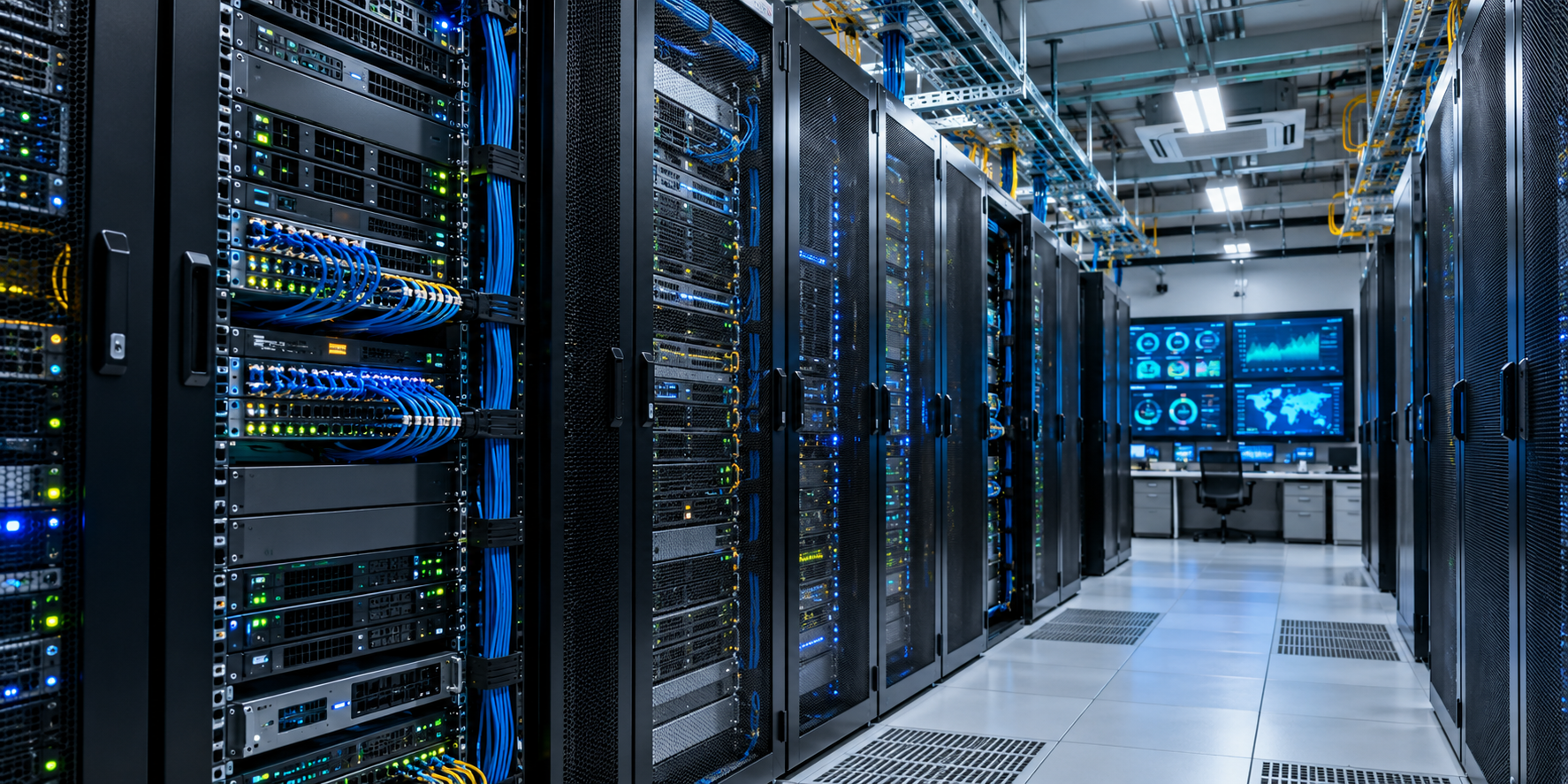
Server Room Best Practices: Improving Reliability, Security and Performance
Effective server room management in Pune supports modern IT infrastructure across India. This coordinated work balances hardware reliability, physical security, and precise environmental control for peak performance.
A well-planned server room design in Pimpri-Chinchwad is essential for maintaining proper airflow, organized cabling, efficient equipment placement, and future scalability. At the same time, strong server room security in Pune helps protect critical hardware, systems, and sensitive business data from unauthorized access and physical threats.
Maintaining a resilient digital environment requires proactive daily tasks. These core pillars help organizations prevent costly downtime and protect sensitive data assets from unexpected threats.
This guide covers seven essential stages of facility oversight. It moves from initial strategy and server room design in Pimpri-Chinchwad through infrastructure upgrades, server room security in Pune, constant monitoring, and final maintenance recommendations. These steps can help your business thrive through strong server room management in Pune.
Key Takeaways
- Establish a holistic strategy for hardware and environmental oversight.
- Prioritize physical security to safeguard critical data assets.
- Optimize cooling and power systems to boost overall performance.
- Implement consistent monitoring protocols to prevent system failures.
- Follow structured design principles tailored for the Indian climate.
Building a Reliable Server Room Management Strategy
A strong management strategy supports every high-performing server environment. Clear operating goals help organizations protect hardware from unexpected failures. This proactive approach to server infrastructure management reduces downtime and protects critical business data.
Define Availability, Capacity and Recovery Objectives
Set uptime, recovery time and recovery point targets
Clear metrics guide strong operations. Set targets for uptime, Recovery Time Objectives (RTO), and Recovery Point Objectives (RPO). These targets guide technical decisions.
Align capacity planning with business growth across India
Businesses in India face unique scaling challenges during rapid digital transformation. Capacity planning must support regional growth and future hardware additions. Power and cooling systems must handle this growth without reducing performance.
Assign Ownership for Server Infrastructure Management
Document responsibilities for facilities, IT and security teams
Clear ownership prevents confusion during critical incidents. Document the roles of facilities, IT, and security teams. This ensures complete coverage of the server infrastructure management lifecycle.
Establish maintenance schedules, escalation paths and change approvals
Formal maintenance schedules and escalation paths support consistent work. Every environmental change should follow a strict approval process. This prevents unauthorized modifications.
Maintain Accurate Server Room Documentation
Keep rack layouts, network diagrams and asset inventories current
Current documentation helps during troubleshooting. Accurate rack layouts and network diagrams show hardware locations and connectivity issues quickly.
Record warranties, dependencies, configurations and maintenance history
Equipment records support long-term planning. Detailed warranty and dependency records keep your server infrastructure management efficient and cost-effective.
| Document Type | Purpose | Update Frequency |
|---|---|---|
| Asset Inventory | Track hardware lifecycle | Quarterly |
| Network Diagrams | Map data flow | After every change |
| Maintenance Logs | Record service history | Immediate |
| Warranty Records | Manage support contracts | Annually |
Designing a Server Room for Environmental Stability and Efficiency
Effective server room design supports stable equipment operation and long-term hardware health. Prioritizing physical layout and environmental controls can greatly reduce downtime risks. A well-planned facility helps infrastructure withstand technical failures and external hazards.
Plan Rack Placement, Airflow and Equipment Density
Use hot-aisle and cold-aisle layouts where appropriate
Arrange racks in alternating rows to improve cooling efficiency. Face server fronts toward a cold aisle and exhaust toward a hot aisle to prevent mixed air streams. This server room design uses strategic airflow management to send cool air straight to intake vents.
Prevent cable congestion and airflow obstruction
Cables can block key ventilation paths when unmanaged. Use overhead cable trays or under-floor raceways to keep the floor clear. Proper cable organization lets air circulate freely and prevents hotspots that can damage sensitive components.
Control Temperature, Humidity and Air Quality
Maintain recommended operating conditions for servers and networking equipment
Servers work best within set temperature and humidity ranges. Keep the room between 18°C and 27°C to support long-term hardware health. These conditions reduce thermal stress and lower the chance of hardware failure.
Use precision cooling, sensors and alerts for high-risk areas
Standard office air conditioning rarely meets the needs of high-density equipment. Deploy precision cooling systems that provide consistent airflow and humidity control. Add environmental sensors to monitor conditions in real time and send alerts when thresholds are exceeded.
Provide Reliable Power and Electrical Protection
Combine UPS systems, power distribution units and backup generators
A strong power strategy is vital for continuous uptime. Use Uninterruptible Power Supply (UPS) systems to bridge power flickers. Pair them with backup generators to keep operations running during extended outages.
Separate critical circuits and test battery performance regularly
Spread power loads across multiple circuits to prevent overloads. Regular battery testing is vital to confirm your UPS can handle the load when needed. Use the following table to track power-component maintenance:
| Component | Maintenance Task | Frequency |
|---|---|---|
| UPS Battery | Load Testing | Quarterly |
| PDU | Connection Check | Bi-annually |
| Generator | Fuel/Oil Inspection | Monthly |
Prepare for Fire, Water and Physical Hazards
Install suitable fire detection and clean-agent suppression systems
Traditional water sprinklers can ruin electronics during a fire. Use clean-agent fire suppression systems that extinguish flames without residue. Early detection systems are also needed to identify smoke before it causes damage.
Protect equipment from leaks, flooding, dust and unauthorized storage
Keep the server room free of non-IT items, such as cardboard boxes and cleaning supplies. Seal the room against dust, and locate it away from plumbing lines to prevent water damage. Good server room design supports physical resilience by treating this space as a dedicated, secure environment for critical assets.
Strengthening Server Room Security and Access Controls
Robust server room security protects against physical and digital threats. It combines physical barriers with advanced monitoring to protect sensitive hardware from unauthorized interference. This approach allows only vetted personnel to handle critical infrastructure.
Control Physical Access to the Server Room
Use badge access, biometric verification and visitor logs
Modern data centers need strong, multi-factor physical entry controls. Organizations should pair badge access systems with biometric checks, such as fingerprint or iris scanners, to confirm each person’s identity. Detailed visitor logs create an audit trail for every person entering the facility.
Apply least-privilege access and review permissions regularly
Least privilege should apply to physical spaces, too. Give access only to staff whose roles require direct hardware contact. Review permissions often, and remove access for employees who changed departments or left the organization.
Improve Surveillance and Incident Visibility
Position cameras to cover entrances, racks and equipment handling areas
Strategic camera placement supports strong server room security. Use high-definition cameras at all entry points, server racks, and equipment handling areas. This view deters tampering and provides evidence when an incident occurs.
Retain access and video records according to organizational requirements
Video surveillance works only when data is stored securely for the right length of time. Match retention policies with local compliance standards and internal security needs. Test playback regularly to ensure footage remains available during investigations.
Secure Racks, Consoles and Removable Media
Lock exposed racks and restrict console access
Physical locks on server racks prevent unauthorized hardware changes and cable tampering. Limit local console access with physical key switches or software lockouts. These controls stop intruders from easily changing systems, even after entering the room.
Control the use, storage and disposal of backup media
Backup media, including tapes and external drives, often holds sensitive data. Keep these items in fireproof, locked safes when not in use. When media reaches the end of its lifecycle, use certified destruction services to prevent unauthorized data recovery.
Connect Physical Protection with Cybersecurity Policies
Separate management networks from production traffic
Effective server room security connects physical and digital safety. Isolate management networks from production traffic to stop attackers from reaching critical infrastructure through compromised workstations. This separation limits the blast radius of any security breach.
Protect administrative accounts with multifactor authentication and privileged access management
Administrative accounts are valuable targets for cybercriminals. Enforce multifactor authentication (MFA) for every management interface access attempt. A Privileged Access Management (PAM) solution adds protection by rotating credentials and logging every administrative action.
Prepare a Response Plan for Security Incidents
Define actions for unauthorized entry, tampering and equipment theft
A clear incident response plan limits damage during a security event. Set protocols for unauthorized entry, physical tampering, or equipment theft. Make sure all staff understand their emergency roles for a fast, coordinated response.
Preserve evidence and coordinate with internal security teams
After a breach, preserving evidence supports forensic analysis. Secure the scene, save relevant logs, and contact internal security or IT response teams at once. These actions help identify the root cause and prevent similar incidents.
| Security Layer | Primary Objective | Implementation Method |
|---|---|---|
| Physical Entry | Identity Verification | Biometrics and Badges |
| Surveillance | Incident Visibility | High-Definition Cameras |
| Hardware Protection | Tamper Prevention | Locked Racks and Safes |
| Network Security | Traffic Isolation | Management VLANs |
Managing Server Infrastructure for Performance and Continuity
Operational excellence in your server room requires strict standards and proactive planning. Structured management keeps hardware reliable and scalable over time.
Standardize Server Configurations and Operating Procedures
Use approved hardware, firmware, operating systems and baseline configurations
Consistency supports a stable environment. Teams should use approved hardware and firmware versions to reduce compatibility issues. A baseline configuration for each server makes deployments predictable and troubleshooting easier.
Apply consistent naming, labeling and patch management practices
Clear identification helps prevent costly errors during emergency repairs. Every rack, cable, and server should use a standardized naming convention. A disciplined patch schedule also protects infrastructure from known vulnerabilities.
Manage Network, Storage and Compute Capacity
Track utilization, bottlenecks and forecasted demand
Capacity management requires clear visibility into resources. Monitoring utilization trends helps administrators find bottlenecks before they harm performance. Forecasting future demand supports timely upgrades and prevents unexpected downtime.
Balance workloads across redundant servers, storage systems and network paths
Distributing workloads stops one component from becoming a failure point. Load balancing across redundant systems keeps traffic moving during peak use. This approach improves the value of existing compute and storage investments.
Apply Safe Maintenance and Change Management
Schedule maintenance during approved service windows
Disruptive updates should happen during approved service windows to limit business impact. Telling stakeholders about these windows manages expectations. It also prepares teams for possible service interruptions.
Test changes, document rollback plans and verify post-change performance
Never deploy a change without a tested rollback strategy. Testing updates in a staging environment confirms that new configurations will not disrupt existing workflows. After implementation, verify that system performance meets established benchmarks.
Build Redundancy and Disaster Recovery Capability
Eliminate single points of failure in power, cooling, networking and storage
Resilience comes from removing dependence on single components. Organizations should invest in redundant power supplies, dual-path networking, and high-availability storage clusters. This design keeps the server room running if a primary component fails.
Test backups, failover procedures and recovery sites in India
A disaster recovery plan works only when tested. Regular backup and failover tests help maintain business continuity. In India, it is vital to ensure that recovery sites are geographically dispersed and fully capable of taking over the primary workload during a crisis.
- Regular Audits: Review configurations quarterly to ensure compliance.
- Automated Alerts: Use monitoring tools to track capacity thresholds.
- Documentation: Keep all rollback plans and recovery procedures updated.
Using Server Room Monitoring to Detect Problems Early
Effective server room monitoring provides the first defense against costly downtime. It gathers live data and helps IT teams spot small problems early. This approach keeps infrastructure stable and efficient during changing workloads.
Monitor Environmental Conditions Continuously
Track temperature, humidity, water leaks, smoke and power quality
Stable conditions help hardware last longer. Place sensors across rack zones to measure temperature and humidity. Water leak and smoke detectors provide quick warnings about physical threats.
Configure thresholds that distinguish warnings from critical alerts
Proper thresholds help prevent alert fatigue. Set ranges for “warning” states that show growing risk and “critical” states that need immediate action. This system helps your team rank tasks by severity.
Monitor Equipment Health and System Performance
Measure server temperature, CPU utilization, memory, storage and network latency
Track the internal health of your servers, not just room conditions. Monitor CPU use, memory use, and storage capacity to see how hard hardware works. Watch network latency to keep data moving steadily for end users.
Identify unusual patterns before they cause outages
Advanced server room monitoring tools can spot changes from normal performance. A sudden disk I/O spike or temperature rise should trigger an alert. Early detection allows investigation during scheduled maintenance instead of a crisis.
Centralize Alerts, Logs and Operational Dashboards
Integrate infrastructure monitoring with service management platforms
Centralization supports effective oversight. Connect monitoring tools with service management platforms to create one source of infrastructure information. This link makes it easier to compare environmental data with system logs.
Route alerts to accountable teams through email, SMS and on-call systems
Notify the right people as soon as an issue appears. Automated routing sends alerts to technicians through email, SMS, or on-call systems. This shortens the time between detection and response.
Use Preventive Maintenance and Trend Analysis
Replace aging batteries, fans, filters and other failure-prone components
Preventive maintenance shows when parts approach the end of their life. Track components such as UPS batteries and cooling fans, then schedule replacements before failure. This lowers the risk of unexpected hardware outages.
Use historical data to improve cooling, capacity and maintenance decisions
Historical data reveals your infrastructure’s long-term needs. Study power use and cooling trends to guide capacity planning. This approach aligns hardware and cooling investments with actual demands.
Measure Reliability with Actionable Performance Indicators
Track uptime, mean time to detect, mean time to repair and incident frequency
Accurate measurement helps improve your processes. Uptime and mean time to repair (MTTR) show how well operations perform. Incident frequency reveals recurring problems that may need a lasting design solution.
Review power usage effectiveness and capacity headroom over time
Power usage effectiveness (PUE) tracking helps reduce energy waste. Capacity headroom shows whether your server room can support future growth. These measures support a sustainable and scalable IT environment.
Test Monitoring and Alert Escalation Procedures
Simulate sensor failures, power interruptions and network outages
Even the best server room monitoring system must work during emergencies. Simulate sensor failures and power interruptions to check your monitoring tools. These drills prepare your team for real failures.
Confirm that alerts reach the right people without excessive noise
Testing helps remove unnecessary alert noise. Confirm that escalation steps are clear and team members avoid non-critical notifications. A well-tuned system makes every alert useful and relevant.
Conclusion
High availability for digital assets requires disciplined server room management. Success comes from combining environmental controls, physical security, and strict maintenance protocols.
Organizations across India must use one strategy to protect critical hardware. A strong framework connects operational goals with the physical data center environment. This alignment keeps systems stable during unexpected challenges.
Reliable IT departments depend on consistent execution. Regularly test disaster recovery plans and monitoring tools to stop small issues becoming major outages. Treat these practices as an ongoing investment in business continuity.
Follow these standards to protect infrastructure from evolving threats. Proactive efforts today build a foundation for long-term growth and technical excellence. Refine internal processes so your server room supports future objectives effectively.
About Us
At Icon Infoline, we help businesses maintain reliable and secure IT infrastructure through effective server room management in Pune. Our approach focuses on organized infrastructure, proper monitoring, security, and performance to support business continuity.
We provide practical IT infrastructure solutions for businesses across Pimpri-Chinchwad and Pune, helping organizations build well-planned server environments with reliable server room design, security, monitoring, and ongoing infrastructure support.
FAQ
Q: What are the primary pillars of an effective server room management strategy?
Q: How can modern server room design improve cooling and energy efficiency?
Q: What physical measures are essential for robust server room security?
Q: Why is standardization critical for server infrastructure management?
Q: How does server room monitoring help prevent unplanned downtime?
Q: What role does disaster recovery play in Indian IT operations?

Recent Posts
Server Room Best Practices: Improving Reliability, Security and Performance

How to Create an Effective IT Budget for a Growing Business