What Is Network Monitoring and Why Is It Important for Businesses?
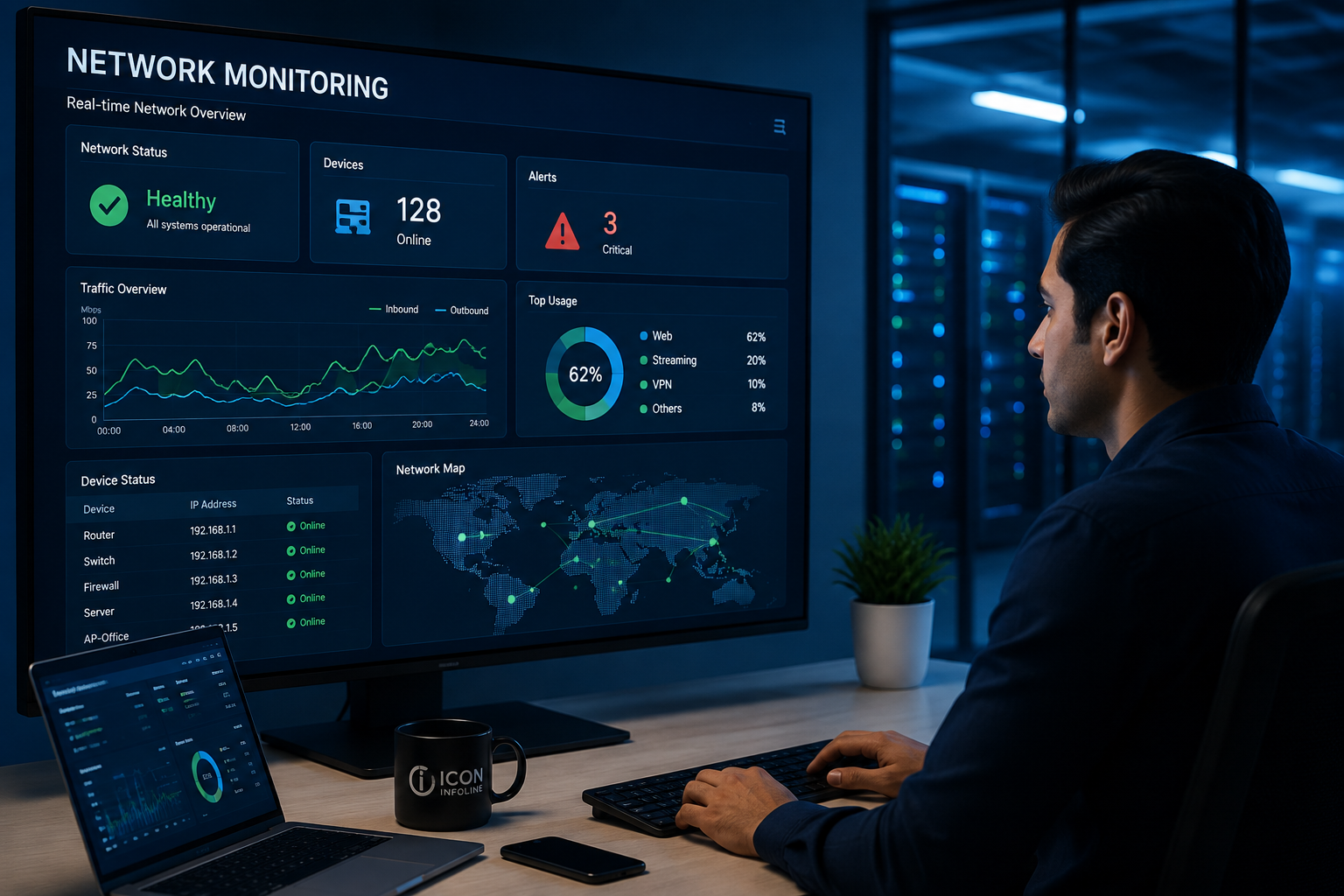
In today’s fast-paced digital world, Indian businesses need smooth connections to grow. Network monitoring is key to watching over traffic, device health, and system performance in your company.
Tracking these important metrics helps keep your systems running smoothly. It boosts daily work. Also, it gives critical security visibility, helping teams spot threats early. Strong network monitoring solutions are now a must for keeping your business running well.
In this article, we’ll show you how to manage your infrastructure well. We’ll cover seven key areas, from the basics to picking the best network monitoring tool for you. You’ll learn how to protect your digital world and keep your business thriving.
Key Takeaways
- Understand the core definition of infrastructure oversight and its role in business stability.
- Learn how consistent performance tracking directly improves employee productivity.
- Discover the link between real-time traffic analysis and enhanced cybersecurity.
- Explore the seven-step framework for deploying effective management strategies.
- Gain insights into choosing the right software to support your unique organizational goals.
What Is Network Monitoring?
Network monitoring is like having eyes and ears for your IT team. It keeps watch over your digital setup to make sure everything works well. This means services are always available and fast.
By checking on routers, switches, and servers, businesses can keep things running smoothly. This is key for companies that need reliable network monitoring solutions to run their day-to-day operations.
Definition and Core Purpose of Network Monitoring
The main goal is to see how well your IT setup is doing. It warns admins about problems before they get worse.
Whether you run a small office or a big company in India, keeping an eye on things is crucial. It helps teams see if their setup meets user and app needs.
How Network Monitoring Differs From Network Management
Though often mixed up, monitoring and management have different jobs. Monitoring spots issues and checks performance.
Management is about fixing problems and setting things up right. Think of monitoring as the detective, and management as the fixer.
Active and Passive Monitoring Methods
IT teams use different ways to understand their setup. They mix methods to watch both outside user experiences and inside device health.
Active Probes and Synthetic Tests
Active monitoring sends fake traffic to check how things work. These tests make sure certain paths or apps are okay.
These probes help find problems before users see them. This is a big part of top network monitoring services today.
Passive Traffic and Device Monitoring
Passive monitoring looks at real traffic without changing it. It shows how much bandwidth is used and checks device health by looking at data packets.
This method is great for finding slow spots and unauthorized access. Below is a comparison of how these approaches differ in practice.
| Feature | Active Monitoring | Passive Monitoring |
|---|---|---|
| Primary Focus | Simulated User Experience | Real-time Traffic Analysis |
| Network Impact | Adds slight overhead | Zero impact on traffic |
| Best Use Case | Testing availability | Troubleshooting performance |
| Data Source | Synthetic probes | Live packet streams |
Choosing the right network monitoring method depends on your business needs. Many use both active and passive network monitoring services for the best view. With strong network monitoring solutions, IT teams keep their setup strong and efficient.
How Network Monitoring Works Across a Business Infrastructure
Network monitoring turns technical data into useful insights for IT teams. It keeps the digital backbone stable and meets user needs.
Collecting Data From Routers, Switches, Servers, and Endpoints
Modern tools collect data by talking to hardware and software. They use SNMP, WMI, and APIs to get updates from routers, switches, and servers.
Endpoints are also tracked to keep workstations and mobile devices secure. This flow of data is key for network performance monitoring across the whole company.
Using Metrics, Logs, Alerts, and Performance Baselines
Collecting data is only useful when compared to standards. Systems set performance baselines to know what’s normal for your setup.
“The goal is to turn data into information, and information into insight.”
When metrics stray from baselines, alerts are triggered. This proactive method lets teams fix issues before they affect users.
Monitoring On-Premises, Cloud, Hybrid, and Remote Networks
Businesses in India often have complex setups. They span physical offices and cloud platforms. A good network monitoring solution must connect on-premises and remote cloud resources.
Hybrid setups need a single view to track traffic across locations. This is crucial for consistent network performance monitoring, no matter where data or employees are.
How Dashboards and Automated Alerts Support IT Teams
Visual dashboards are the IT command center. They simplify complex data into easy-to-read charts and graphs.
Automated alerts make sure the right people know about issues right away. By automating detection, network monitoring tools let staff focus on strategic improvements. This is key for high availability in today’s fast market.
Why Network Monitoring Is Important for Businesses
Network monitoring is key for success in today’s digital world. It keeps your IT systems running smoothly. This approach helps companies tackle technical issues proactively, not just react to them.
Preventing Costly Downtime and Service Disruptions
Unexpected outages can really hurt a business. They cause big financial losses and harm your reputation. With network monitoring, IT teams can spot problems early. This way, they can fix issues during planned maintenance, not when they’re busy.
“The cost of downtime is not just measured in lost revenue, but in the erosion of customer trust and the disruption of critical internal workflows.”
Improving Network Performance and Employee Productivity
Slow apps and slow connections can really slow down work. Network performance monitoring helps find and fix these problems. When systems run smoothly, employees work better and are happier.
- Reduced latency for cloud-based applications.
- Optimized bandwidth allocation for critical tasks.
- Faster troubleshooting for remote and on-site teams.
Detecting Security Threats and Unusual Network Activity
Good security starts with knowing what’s normal. By setting a baseline, your system can spot unusual patterns quickly. This means security teams can act fast to stop threats before they spread.
Supporting Business Continuity and Disaster Recovery
A solid monitoring plan is crucial for keeping business running smoothly. It checks that backup systems work and failover processes kick in as needed. The goal is to keep your business up and running, even when things go wrong.
Meeting Operational and Compliance Needs for Indian Businesses
In India, following strict rules is part of daily work. Finance and healthcare need detailed logs and reports for audits. Network monitoring helps keep the records needed to show you’re meeting these standards.
As Indian companies grow, their IT systems get more complex. A single view of all assets helps IT teams manage these systems well. This is key for keeping up with the high service standards Indian customers expect.
What Network Monitoring Tracks and Detects
A good monitoring platform is like having eyes and ears for your digital space. It collects detailed data, helping IT teams turn raw traffic into useful insights. This visibility is key to effective network monitoring.
Availability, Latency, Packet Loss, and Bandwidth Usage
Admins need to watch basic performance metrics to keep connections stable. These metrics show the health of your data paths.
- Availability: Makes sure important services stay online and accessible.
- Latency: Shows how long data takes to travel across the network.
- Packet Loss: Finds missing data parts that lower connection quality.
- Bandwidth Usage: Tracks how much capacity apps or users use.
Device Health, Capacity, and Resource Utilization
It’s also important to check the physical and virtual devices that support your work. Resource utilization shows how hard servers and switches are working. High CPU or memory use means a device is almost full.
Application Response Times and User Experience
Just checking the infrastructure isn’t enough. Network performance monitoring tools measure how fast apps respond to user requests. This helps teams find issues that affect users, even if the network seems fine.
Outages, Bottlenecks, Configuration Errors, and Failing Hardware
Teams can fix problems before they become big outages with proactive detection. Monitoring systems are great at finding:
- Bottlenecks: Places where traffic slows down business processes.
- Configuration Errors: Settings that don’t match and cause connectivity issues.
- Failing Hardware: Signs from power supplies or cooling fans that something is wrong.
Early Indicators of Intrusions, Malware, and Unauthorized Access
Security is a big part of network monitoring today. Unusual traffic patterns can be the first sign of a breach. By knowing what’s normal, your system can quickly spot:
- Unauthorized Access: Attempts to connect from unknown devices or places.
- Malware Indicators: Sudden increases in traffic or talks to suspicious servers.
- Intrusions: Activity that doesn’t fit with usual operations.
How to Choose and Implement Network Monitoring Solutions
Choosing the right network monitoring strategy needs a good understanding of your needs. Before picking a platform, check your current digital setup. This ensures the technology fits your future goals.
Assessing Network Size, Architecture, and Monitoring Requirements
Start by checking your current hardware, like routers and switches. Knowing what you have helps decide if you need a simple or complex system.
Think about how complex your setup is, if it’s a mix of old and new systems. Scalability is key, as your needs will grow with your business in India.
Comparing Network Monitoring Tools and Network Monitoring Services
Deciding between managing it yourself or using network monitoring services depends on your IT team. Self-managed tools give you full control, but services offer expert help and less work for your team.
| Feature | Self-Managed Tools | Managed Services |
|---|---|---|
| Control | High | Moderate |
| Maintenance | Internal Team | Provider |
| Cost Model | Licensing | Subscription |
Essential Features of the Best Network Monitoring Tool
The best network monitoring tool should have easy-to-use dashboards and detailed traffic insights. Look for tools that show real-time data to spot problems quickly.
Scalability, Integrations, Reporting, and Mobile Access
Make sure your tool works well with your current systems. Good reporting is key for keeping records, and mobile access lets your team work from anywhere.
Security, Data Privacy, and Support Considerations in India
When choosing network monitoring solutions, focus on vendors that follow local data rules. A provider with dedicated support teams in India means you get help fast when you need it.
“The goal of technology is not to replace human intelligence, but to amplify it through better visibility and faster insights.” — Anonymous
Creating Useful Alerts Without Overwhelming IT Teams
Alerts can be overwhelming and lead to missing important issues. Set up your system to focus on serious alerts and ignore the rest.
Combining Network Performance Monitoring With Security Visibility
Modern network performance monitoring should do more than just check if everything is up. By adding security logs, you can spot unauthorized access or unusual traffic that might be a threat.
Planning Deployment, Baselines, Testing, and Ongoing Optimization
Begin by setting up performance baselines during regular hours. This data helps spot future problems.
Do a test run before fully implementing to make sure everything works right. Treat network monitoring in pune as an ongoing process, adjusting settings as your business grows.
Conclusion
Today’s businesses need to stay online all the time to stay ahead. Using strong network monitoring helps you see how well your systems are working. It shows you how available, fast, and big your network is.
By picking the right tool, you learn more about how users feel and any security risks. You need to know your network setup and future plans in India well.
Working with network monitoring experts can really help. They match your technical needs with your business goals. This way, your team gets alerts that matter, without too much noise.
Good network monitoring tools collect accurate data and are easy to use. You should always be improving to meet digital changes. This approach cuts down on downtime and makes your business more reliable.
Look at your network now to find where you’re missing out. Being proactive about monitoring keeps your business safe and your team ready. Making smart choices is the first step to a stable and secure network.
About Network Monitoring
Network monitoring helps businesses continuously track network performance, connected devices, bandwidth, uptime, and security activity. Icon Infoline provides network monitoring solutions that help IT teams identify issues early, reduce downtime, and maintain reliable network performance. Businesses looking for network monitoring services in Pimpri-Chinchwad can benefit from proactive monitoring, timely alerts, and better visibility into their IT infrastructure.
FAQ
Q: What is the primary difference between network monitoring and network management?
Q: How do active and passive monitoring methods differ in a business environment?
Q: What specific metrics should a network performance monitoring strategy track?
Q: Why is network monitoring critical for operational resilience in India?
Q: How does monitoring scale across hybrid and cloud infrastructures?
Q: How can a business identify the best network monitoring tool for its needs?
Q: Can network monitoring help in detecting cyber threats?
Q: What is the best way to implement alerts without causing “alert fatigue”?

Recent Posts

DPDP Compliance: A Complete Guide for Businesses
Server Room Design: Best Practices for Improving Reliability, Security and Performance in Pune